How to Track COI Expiration Across Multiple Properties

A Certificate of Insurance (COI) is a document from a vendor’s insurer confirming active coverage. Tracking COI expiration across multiple properties means collecting, validating, and monitoring that certificate for every vendor on every property, so coverage never lapses without your team knowing. Manual tracking with spreadsheets, inbox reminders, and follow-up calls breaks down once a portfolio grows past a handful of properties. Automated systems solve this by tracking expiration dates, validating coverage requirements, and alerting vendors and property teams the moment action is required.
Steps to Track COI Expiration Across Multiple Properties
- Centralize all vendor certificates in a single system (not spreadsheets or shared drives) so expiration dates are visible across the entire portfolio in one place.
- Use automated expiry notifications ahead of every policy expiration so vendors receive renewal reminders without staff follow-up.
- Configure coverage requirements by property type, ownership group, or service category so validation is automatic when new certificates are submitted.
- Flag non-compliant vendors on a live dashboard so property teams can see who is out of compliance without pulling individual records.
- Integrate your COI tracking system with your PMS so vendor compliance status is visible inside the workflows your team already uses.
- Run a monthly compliance audit across the portfolio to catch any vendors whose coverage lapsed between renewal cycles.
Why Vendor Insurance Compliance Is Critical for PMCs
- Reduces liability: A missing or expired COI could leave your company financially responsible for vendor incidents.
- Maintains compliance: Many PMCs are contractually obligated to ensure vendor compliance.
- Enables smoother audits: Having a reliable system in place makes audits faster and less stressful.
Manual tracking leaves PMCs exposed to liability, compliance gaps, and last-minute audit scrambles. NetVendor blocks noncompliant vendors at bid award, contract signature and renewal, and payment at the PO and invoice stage, so a lapse in coverage is caught before money moves, not discovered after an incident.
Schedule a demo to see how it works in practice.

What Are Automated COI Tracking Solutions for Property Managers?
Automated COI tracking solutions for property managers are purpose-built platforms that centralize vendor insurance compliance across an entire portfolio. These solutions automatically collect Certificates of Insurance, validate coverage requirements, track expiration dates, and alert both vendors and property teams when action is required. Unlike manual processes, automated solutions scale with vendor volume and integrate directly with property management systems. The result is continuous compliance, reduced liability exposure, and audit-ready documentation without administrative burden. NetVendor’s automated COI tracking verifies policy endorsements, not just certificates, and enforces requirements at bid award, contract signature and renewal, and payment.
The Problem: Why COI Tracking Is Still Broken
Despite its importance, COI tracking remains one of the most outdated, manual processes in property management. This is exactly why property managers are turning to automated COI tracking solutions rather than trying to fix broken manual systems.
These issues scale with your portfolio size, especially across portfolios with hundreds of vendors and multiple ownership groups. Manual workarounds that hold at ten properties fail at a hundred, and the exposure rolls up to leadership.
The Solution: Compliance-Led Automation Built for Property Managers
Compliance-led automation means replacing outdated manual processes with a system that:
- Automatically requests updated COIs before expiration
- Tracks coverage types and limits for each vendor
- Flags non-compliant vendors
- Offers a real-time compliance dashboard
- Integrates with your Property Management Software (PMS)
NetVendor built its platform on Compliance-Led Vendor Management. Requirements are configured by owner, property, and vendor type, and compliance status syncs to Yardi, RealPage, AppFolio, Entrata, MRI, ResMan, and Rent Manager, including concurrent multi-PMS environments, so noncompliant vendors are stopped at the PO and invoice stage, not after the work is done.Vendor lifecycle control is the mechanism behind Compliance-Led Vendor Management: vendor requirements are verified at onboarding, monitored continuously, and enforced at every governed action, including bid award, contract signature and renewal, and payment. It ensures compliance is not just verified at a point in time, but holds for as long as a vendor works in the portfolio.
How COI Automation Works in Property Management
Most automated COI platforms follow a common core workflow, designed to reduce manual oversight and improve compliance accuracy.
1. Vendor Onboarding with Insurance Requirements
When a new vendor is onboarded, the system notifies them of insurance requirements and collects their COI. NetVendor applies unlimited compliance models, configured by owner, property, and vendor type, set once at HQ and enforced automatically across every property, so the front line never has to manage requirements by hand.
2. AI-Accelerated COI Validation, Expert Verified
Once uploaded, each COI is validated by checking:
- Policy coverage types (e.g., General Liability, Workers’ Comp)
- Required limits (e.g. $1M/$2M coverage)
- Required policy endorsements
- Expiration and effective dates
NetVendor’s Intelligent Processing Center reads, maps, and classifies each COI and recommends an approve or reject decision for licensed insurance professionals to verify, so vendors reach compliance faster without removing human judgment.
3. Auto-Reminders, Escalation, and Vendor Accountability
As COIs near expiration, the system sends automatic reminders to vendors. If no action is taken, NetVendor escalates the issue to the PMC for resolution, ensuring accountability.
4. Dashboards, Reporting, and Audit Readiness
PMCs gain real-time visibility into vendor compliance across portfolios, regions, and service types, and manage every branch and property from one place with standards set at HQ. During audits, COIs are downloadable in a few clicks, eliminating the scramble.

Key Benefits of Automated COI Tracking for Property Managers
The value of automated COI tracking goes beyond convenience; it directly impacts risk, efficiency, and scalability.
- Reduced Risk and Liability Protection: Automated tracking surfaces coverage lapses before they become exposure, closing gaps that could lead to costly liability claims.
- Time Savings for Property Management Teams: Instead of manually chasing vendors, your operations and accounting teams receive real-time dashboards and automated alerts.
- Scalable Vendor Insurance Compliance Across Portfolios: Whether you manage 50 properties or 1,500, COI workflows stay consistent, with no spreadsheet chaos.
- Better Vendor Accountability and Compliance Enforcement: Vendors receive clear guidance, and noncompliance escalates automatically without relying on your team to follow up.
- Always Audit-Ready: No more last-minute hunts through emails. COIs are centralized and exportable in a few clicks.
What Top Property Management Companies Are Doing Differently
Leading property management companies have moved from reactive COI collection to centralized compliance control, and the results are measurable. Horizon Realty Advisors, a multifamily and student housing operator managing 600+ vendors, recovered 30 hours per week and $30K+ in annual labor savings after replacing manual COI tracking with automation. Berger Communities, managing 60 communities, achieved 99% risk reduction, replaced the binder its accounting team used to track compliance, and streamlined onboarding for new properties. In commercial real estate, NSA Storage (now part of Public Storage) moved from spreadsheet-tracked COIs and missed renewals to automated tracking across 2,000+ vendors and now keeps 1,100+ properties audit ready.
The shift is consistent: centralized systems, standardized requirements across properties, and enforcement that doesn't depend on staff remembering to follow up.
How to Evaluate Automated COI Tracking Solutions for Property Managers
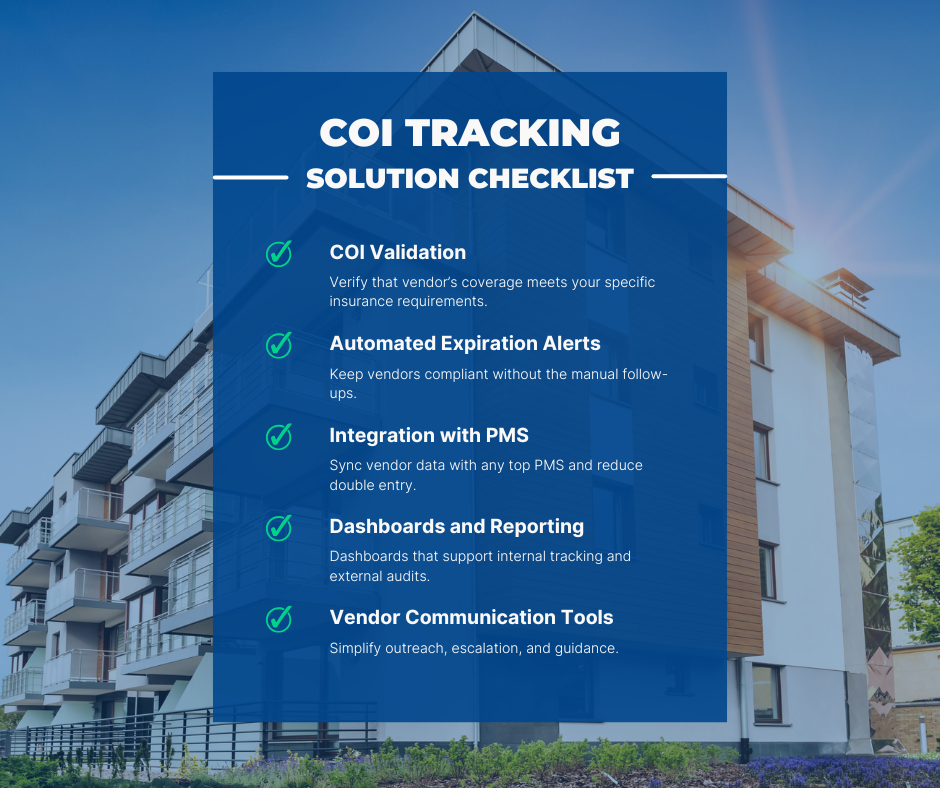
When selecting a tool to manage COIs, look for:
- COI Validation: Verify that the vendor’s coverage meets your specific insurance requirements.
- Automated Expiration Alerts: Keep vendors compliant without the manual follow-ups.
- Integration with PMS: Sync vendor data with leading PMS systems to reduce duplicate data entry.
- Dashboards and Reporting: Dashboards that support internal tracking and external audits.
- Vendor Communication Tools: Simplify outreach, escalation, and guidance.Endorsement Verification: Confirm required policy endorsements are in place, not just that a certificate exists.
- Enforcement at Governed Actions: Block noncompliant vendors at bid award, contract signature and renewal, and payment, rather than only flagging them.NetVendor verifies policy endorsements, not just certificates, and draws on a network of 275K+ vendors, 100K+ already credentialed.
Frequently Asked Questions About COI Automation
What is the best automated COI tracking solution for property managers?
The best automated COI tracking solution validates coverage automatically, tracks expirations in real time, integrates with leading PMS platforms, and scales across large vendor networks. The strongest platforms go beyond tracking: they configure compliance by owner, property, and vendor type, and block noncompliant vendors at bid award, contract signature and renewal, and payment instead of just flagging them.
Can my vendors easily upload their COIs?
Yes. Vendors upload their COIs through a guided online enrollment. NetVendor goes further by contacting their insurance agent directly, so vendors are not chasing down their own documentation, and offers bilingual support in English and Spanish. Vendors are also alerted automatically when coverage nears expiration or lapses.
Can compliance requirements differ by owner, property, and vendor type?
Yes. Requirements can be configured by owner, property, and vendor type, which matters for portfolios with multiple ownership structures or different requirements across property types. NetVendor supports unlimited compliance models, set once at HQ and enforced automatically, so the front line never has to manage them.
What happens if a vendor doesn’t update their COI?
The system automatically escalates non-compliance, flagging the vendor on your compliance dashboard and notifying your team. A vendor cannot be marked compliant until updated documentation is submitted and validated against your coverage requirements. Until then, NetVendor blocks that vendor at bid award, contract signature and renewal, and payment at the PO and invoice stage.
Stop Chasing Paperwork with COI Automation
Automated COI tracking is no longer optional, but tracking documents is only the entry point. The PMCs pulling ahead treat compliance as a control mechanism, not a monitoring task, enforcing it at bid award, contract signature and renewal, and payment across every property and ownership group. That is the shift from COI tracking to Compliance-Led Vendor Management. NetVendor verifies policy endorsements, not just certificates, monitors coverage continuously, and blocks noncompliant vendors at each of those points, so a lapse is caught before payment, not after an incident. Don’t wait for the next audit to scramble for compliance records.
Ready to Simplify COI Tracking?
Explore how NetVendor’s Compliance-Led Vendor Management enforces compliance from vendor onboarding through bid award, contract signature and renewal, and payment.
Download the State of Vendor Management report
Download our report for a broader view of how compliance-driven vendor management is evolving across portfolios.


Kristen Andrews is a two-time founder who scaled a brand to 100M+ reach before bringing that operator mindset to B2B SaaS. As NetVendor's Director of Marketing, she owns the full GTM function, from demand generation and ABM to category positioning and PE board reporting.